How to Activate a Ubisoft Connect Game Key
Got a new Ubisoft Connect game code and wondering what to do next? Follow this simple 3-step guide to activate your key and start playing. Works for all Ubisoft titles including Assassin's Creed, Far Cry, and Rainbow Six Siege.
Step-by-Step Guide
Download and Install Ubisoft Connect
Visit ubisoftconnect.com and download the desktop client for your PC. Follow the installer prompts to complete the setup.

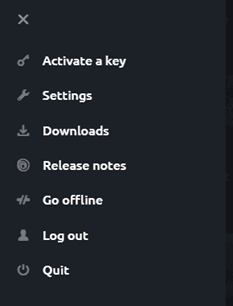
Sign In and Click "Activate a key"
Launch the Ubisoft Connect app, sign in to your Ubisoft account, then open the side menu (☰) and select "Activate a key" from the list of options.
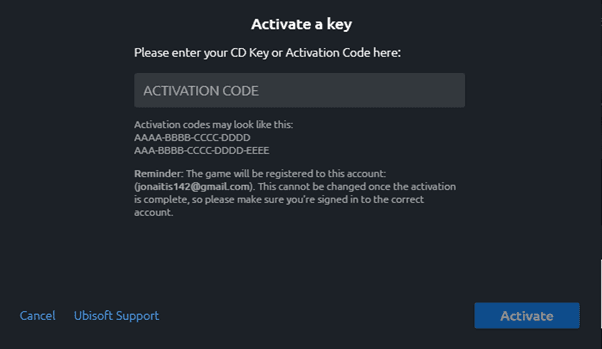
Enter Your Code and Click "Activate"
Paste the game key into the pop-up window and submit. The game will be added to your library and available for download immediately.
Frequently Asked Questions
- What's the difference between Ubisoft Connect and Uplay?
- Uplay was the original name. Ubisoft Connect is the rebranded platform that merged Uplay and Ubisoft Club rewards into a unified launcher. All existing Uplay accounts were automatically migrated to Ubisoft Connect.
- Can I play Ubisoft games through Steam if I bought a Ubisoft Connect key?
- No, Ubisoft Connect keys are separate from Steam. However, some games purchased on Steam still require Ubisoft Connect to launch — Steam will prompt you to link your Ubisoft account during the first launch.
- My Ubisoft Connect key says it's region locked. What does this mean?
- Some keys are restricted to specific regions (e.g., Europe only). Make sure your Ubisoft account region matches the key's region. You can check your account region in Ubisoft Connect settings under Account Information.