🌿
DealNest
Guide

How to Activate a Steam Game Key

Bought a game key from a third-party store and not sure how to redeem it on Steam? Follow this step-by-step guide to activate your CD key in under 5 minutes.

~5 min read7 simple stepsWorks on Windows, Mac & Linux

Quick Steps

  1. 1Login to your Steam account
  2. 2Click "ADD A GAME..."
  3. 3Select "Activate a Product on Steam..."
  4. 4Click "NEXT"
  5. 5Accept the Steam Subscriber Agreement
  6. 6Enter your game code
  7. 7Install your game

Step-by-Step Instructions

1

Login to your Steam account
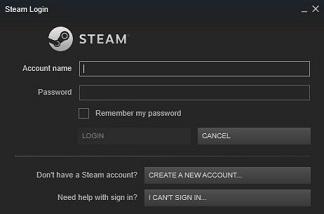
Screenshot: Login to your Steam account β€” Steam client window showing the activation process

Open the Steam client on your PC and sign in with your username and password. Make sure you have an active internet connection. If you have Steam Guard enabled (recommended), you will need to approve the login from the Steam mobile app.

2

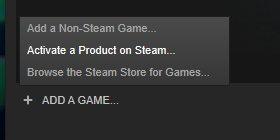
Click "ADD A GAME..."

Screenshot: Click "ADD A GAME..." β€” Steam client window showing the activation process

Look at the bottom-left corner of the Steam client window. Next to your friends list, you will see a button labeled "ADD A GAME..." β€” click it to open the dropdown menu.

3

Select "Activate a Product on Steam..."

Screenshot: Select "Activate a Product on Steam..." β€” Steam client window showing the activation process

From the dropdown menu that appears, select the option "Activate a Product on Steam..." This will open the product activation wizard that guides you through the redemption process.

4

Click "NEXT"

Screenshot: Click "NEXT" β€” Steam client window showing the activation process

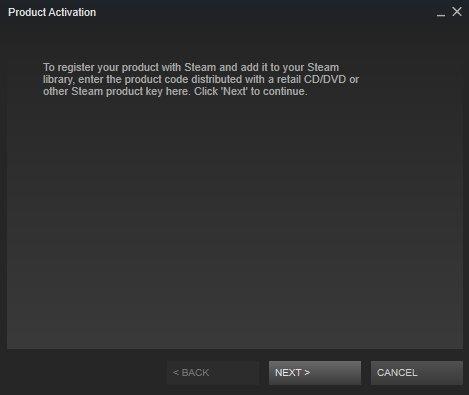
The product activation dialog will appear. Read the instructions, then click the "NEXT" button to continue past the welcome screen.

5

Accept the Steam Subscriber Agreement

Screenshot: Accept the Steam Subscriber Agreement β€” Steam client window showing the activation process

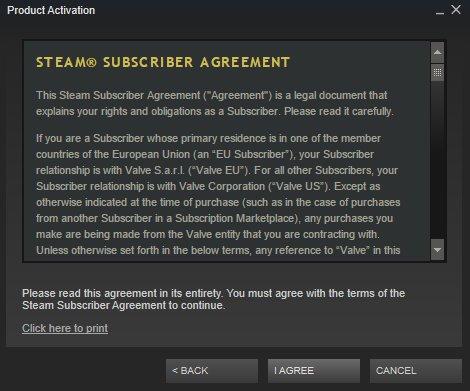
You will be presented with the Steam Subscriber Agreement. Take a moment to review the terms, then click "I Agree" to proceed with the activation.

6

Enter your game code

Screenshot: Enter your game code β€” Steam client window showing the activation process

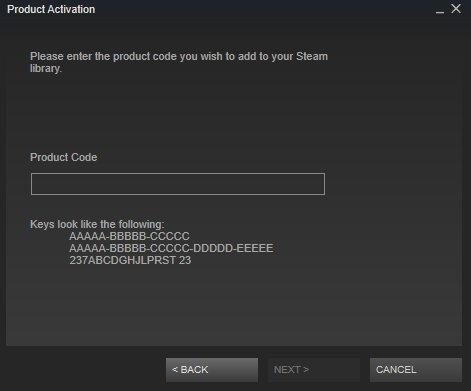
Copy and paste (or carefully type) your CD key into the text field. A valid Steam key consists of 25 characters arranged in 5 groups separated by hyphens (format: XXXXX-XXXXX-XXXXX). Click "NEXT" to verify and redeem the key.

7

Install your game

Screenshot: Install your game β€” Steam client window showing the activation process

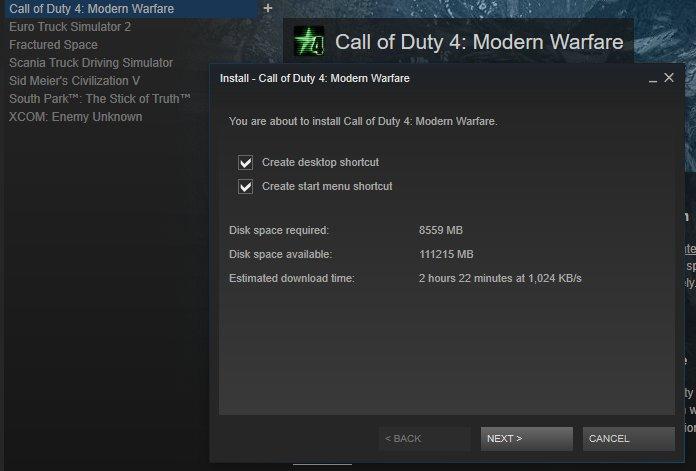
After the key is successfully redeemed, the game will appear in your Steam library. Double-click it to begin the installation. Choose your preferred install location and wait for the download to complete. Happy gaming!

Pro Tip: Keep your CD keys safe β€” each key can only be activated once. After activation, the game is permanently linked to your Steam account.

Frequently Asked Questions

Why is my Steam key not working?

Make sure you are entering the key exactly as provided β€” a valid Steam key has 25 characters in 5 groups separated by hyphens (e.g., XXXXX-XXXXX-XXXXX). Check for common typos: the number zero (0) vs. the letter O, or the number one (1) vs. the letter I. Also verify that the key is for your region, as some keys are region-locked.

Can I activate a Steam key from another region?

Most Steam keys are region-locked to the country or region they were purchased for. If you try to activate a key that is locked to a different region, Steam will display an error message. Always check the product listing for region restrictions before purchasing. Using a VPN to bypass region restrictions violates the Steam Subscriber Agreement and may result in account restrictions.

Where can I find the best Steam game deals?

You can browse our Steam deals section to compare prices across multiple stores in real time. We aggregate official stores like Steam, Epic, and GOG along with authorized key resellers so you always get the best price. Check back regularly β€” prices update frequently, and our price alert feature can notify you when your favorite games drop to your target price.

Looking for your next game at the best price?

Compare prices across official stores and trusted resellers on DealNest.

Browse All Deals