How to Activate an EA Game Key
Just picked up a key for Battlefield, FIFA, The Sims, or another EA title? There are two ways to redeem it: through the EA App desktop client or directly on the EA website. Both methods are quick and take only a few minutes.
Method 1: Using the EA App (Desktop)
The EA App is the official desktop client for EA games. This is the recommended method if you plan to download and play EA titles on your PC.
Open EA app and click "Redeem Code"
Download the EA app from ea.com if you haven't already. Launch the desktop client, click "My Collection" in the left sidebar, then click the "Redeem Code" button.
Enter your code and click "Next"
Paste your game key into the text field. Double-check that there are no extra spaces before or after the code — a stray space can cause a redemption error. Click "Next" to confirm.
Method 2: Using the EA Website
Prefer not to install the desktop client? You can redeem your code directly through the EA website in your browser.
Sign in and go to Account Settings
Visit ea.com in your browser and sign in with your EA account. Click your avatar in the top-right corner and navigate to your Account Settings page.
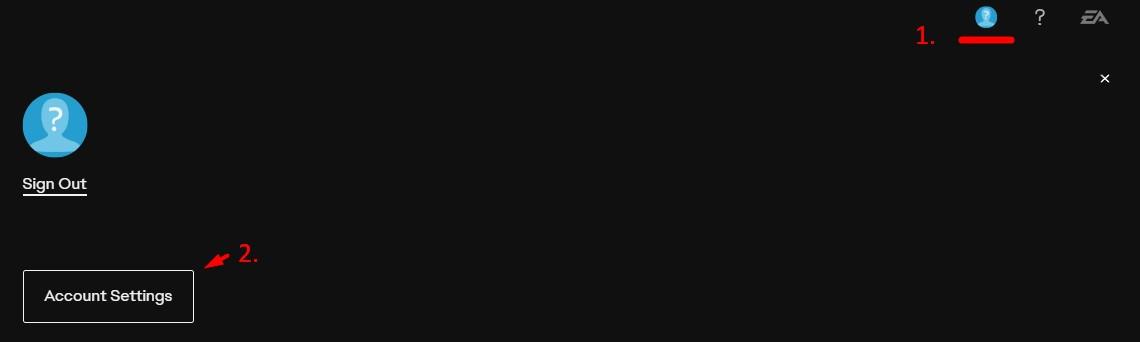
Click "Redeem Product Code"
On the left sidebar, find and click "Redeem Product Code". Enter your game key in the input field, verify it matches what you purchased, and click "Next" to complete the redemption.
Frequently Asked Questions
- What happened to Origin? Is it the same as the EA App?
- The EA App (formerly EA Desktop) replaced Origin as EA's official PC game launcher in 2022. If you still have Origin installed, it should automatically update to the EA App. All your games, saves, and friends list carry over.
- Can I play EA games offline?
- Some EA games support offline mode, but most require periodic online authentication. Check the specific game's requirements on its store page or in the EA App library before relying on offline play.
- My EA key requires an EA Play subscription. Is that separate?
- EA keys for individual games don't require EA Play. EA Play is an optional subscription that gives you access to a library of games, similar to Xbox Game Pass. If you purchased a standalone game key, you own that game permanently without any subscription.